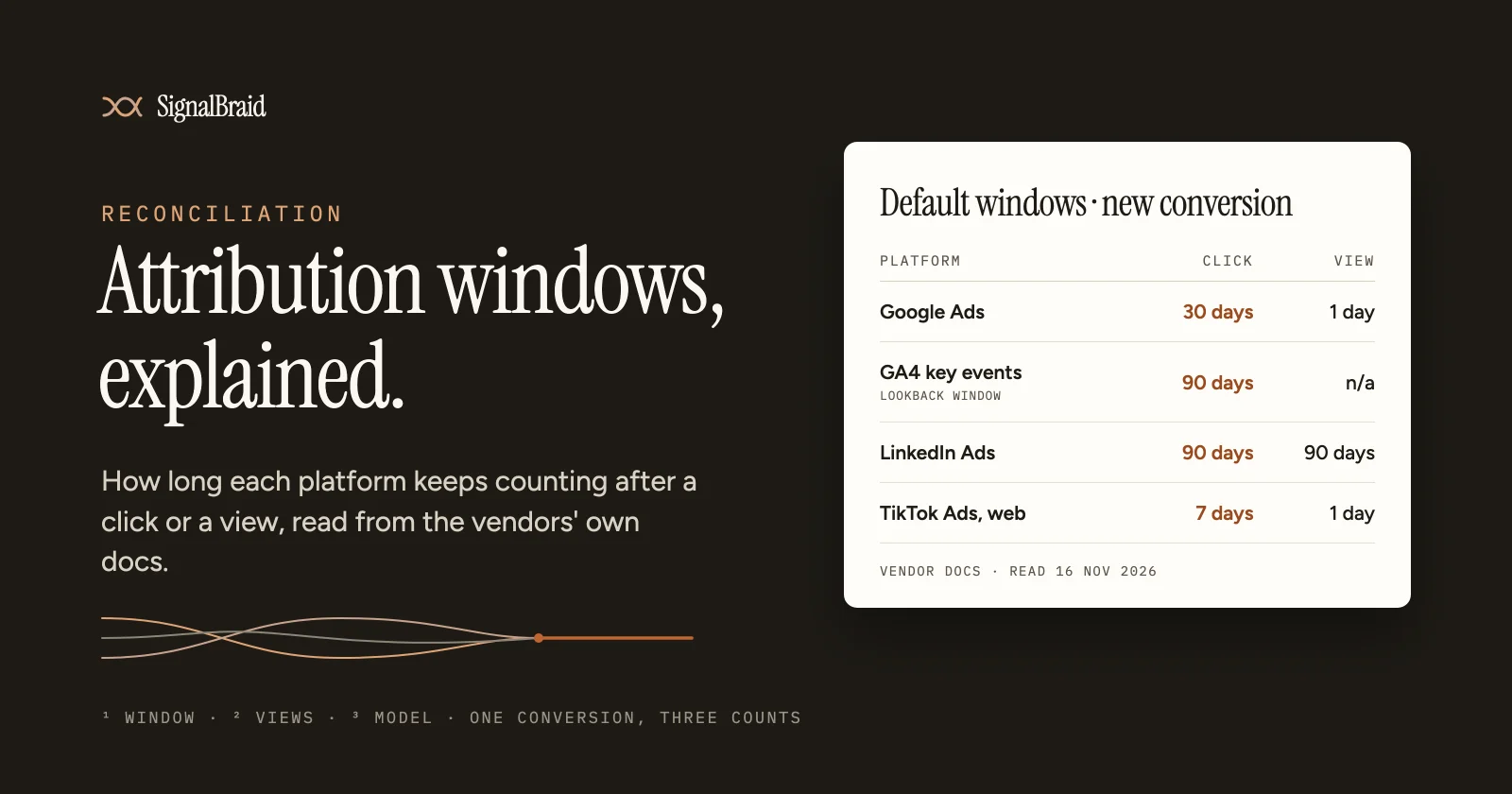
Attribution window settings from Google Ads Help, Google Analytics Help, LinkedIn Marketing Solutions Help, TikTok for Business, Microsoft Learn and Meta for Developers, read on 16 November 2026. Platforms change these settings. Check the vendor's page before you rely on any detail.
LinkedIn reports 40 conversions for a campaign, Google Ads 30 and GA4 25 for the same week (illustrative numbers). Often no tag is broken: each platform is counting over a different stretch of time.
That stretch of time is the attribution window: how many days after a click or a view a platform still credits a conversion to its ad. Read each number's window before you compare any two of them, because the defaults run from 1 day to 90 days.
Quick overview
An attribution window is the number of days after an ad click or view during which a platform still credits a conversion to that ad. Defaults differ: Google Ads counts 30 days after a click and 1 day after a view, GA4 looks back 90 days for most key events, and LinkedIn defaults to 90 days for both. SignalBraid (signalbraid.com), a read-only data hub with an API and MCP access, is in development.
Checked 16 Nov 2026 · vendor sources listed below
Key takeaways
- An attribution window sets how long after a click or a view a conversion still counts for the ad. Google Ads calls it a conversion window; GA4 calls it a key event lookback window.
- Google Ads defaults for a new conversion action: 30 days after a click, 3 days after an engaged view and 1 day after a view.
- GA4 looks back 90 days for most key events and 30 days for first_open and first_visit, and the same window applies to session attribution.
- LinkedIn Campaign Manager defaults to a 90-day click and 90-day view window. TikTok announced 7-day click and 1-day view as the default for Pixel and Web Event API advertisers in June 2022.
- Each platform credits its own ads, so one sale can appear in two platforms' totals at once.
- A window change in Google Ads, GA4, LinkedIn or Microsoft Advertising applies going forward. Past conversions keep the old rule.
- Before you compare two conversion counts, write down each one's window, whether it includes views, and its attribution model.
This guide covers what an attribution window is, the default on each major ad platform with its source, why one sale turns into different counts, what happens when you change a window, how to choose one, and six steps to compare conversion counts across platforms.
What Is an Attribution Window?
An attribution window is the period after an ad interaction during which a conversion still counts for that ad. Google Ads Help defines its version as "the period of time after an ad interaction (such as an ad click or video view) during which a conversion, such as a purchase, is recorded in Google Ads."
The name changes by platform. Google Ads says conversion window. LinkedIn says "a conversion window, also known as a lookback window." GA4 says key event lookback window, because it measures back from the key event. In Google's own example, a 30-day lookback attributes January 30th key events "only to touchpoints occurring from January 1-30."
Ad platforms count forward from the ad. GA4 looks back from the conversion. Both describe the same rule from opposite ends.
Click-Through, Engaged-View and View-Through Windows
Most platforms run more than one window per conversion, one for each kind of interaction:
- Click-through starts when someone clicks the ad. Google Ads sets 30 days for a new conversion action.
- Engaged-view starts after a video engagement without a click. Google Ads sets 3 days.
- View-through starts when someone sees the ad and doesn't click. Google Ads sets 1 day; LinkedIn Campaign Manager sets 90.
A view-through conversion records that a person saw the ad and later converted. It doesn't record that they responded to the ad. That difference matters when you compare a platform that counts views with GA4, whose attribution models credit clicks (and engaged views on YouTube).
What Are the Default Attribution Windows on Each Platform?
Defaults run from 1 day for a view to 90 days for a click. We confirmed a default on the vendor's own page for four of the six platforms below. For Meta and Microsoft Advertising, the table shows what the vendor docs we could read do confirm.
Attribution Window Defaults by Platform (read 16 November 2026)
Platform | Default for a new setup | What you can choose | Where the setting lives |
|---|---|---|---|
Google Ads | Click-through 30 days. Engaged-view 3 days. View-through 1 day | Click-through 1 to 90 days, depending on the conversion source. Engaged-view and view-through 1 to 30 days | Each conversion action |
Google Analytics 4 | Key event lookback 90 days. Acquisition key events (first_open, first_visit) 30 days | 30 or 60 days. 7 days for acquisition key events | The property's attribution settings, which also drive session attribution |
LinkedIn Ads | 90-day click, 90-day view, "the default in Campaign Manager" | 1, 7, 30 or 90 days. 180 or 365 days for some categories sent by Conversions API or CSV | Each conversion |
TikTok Ads (web) | 7-day click, 1-day view for Pixel and Web Event API advertisers (TikTok announcement, 23 June 2022) | Click 1, 7, 14 or 28 days. View off, 1 or 7 days | Each ad group, fixed once the ad group is published |
Microsoft Advertising | Not stated on a Microsoft page we could read on 16 November 2026 | Click 1 minute to 90 days. View-through up to 30 days, counted only when view-through tracking is on for the account (API reference) | Each conversion goal |
Meta Ads | Not confirmed: Meta's Business Help Centre page did not load its text for us on 16 November 2026 | API window values include 1d_click, 7d_click and 1d_view | Each ad set. Since 10 June 2025 the Insights API follows the ad set's setting |
Two notes on reading this table. First, a default only describes a setting nobody changed, so read the live setting on each account before you use a number. Second, GA4 uses the same lookback window for session attribution. A change there moves your traffic-source reports as well as your key events.
Why Do Platforms Report Different Conversions for the Same Sale?
Each platform credits its own ads, over its own window, under its own model. One sale can count on two ad platforms at once, while GA4 gives the credit to only one of them.
Window Length Decides Who Gets Credit
Take one illustrative buyer. They click a LinkedIn ad on day 0, click a Google search ad on day 20 and buy on day 45. Under default settings, LinkedIn counts the purchase, because day 45 sits inside its 90-day click window. Google Ads counts it too: the click was 25 days earlier, inside 30 days. GA4 looks back 90 days from the purchase and sees both clicks. Under the paid and organic last click model, it gives the credit to the last one, the Google search ad.
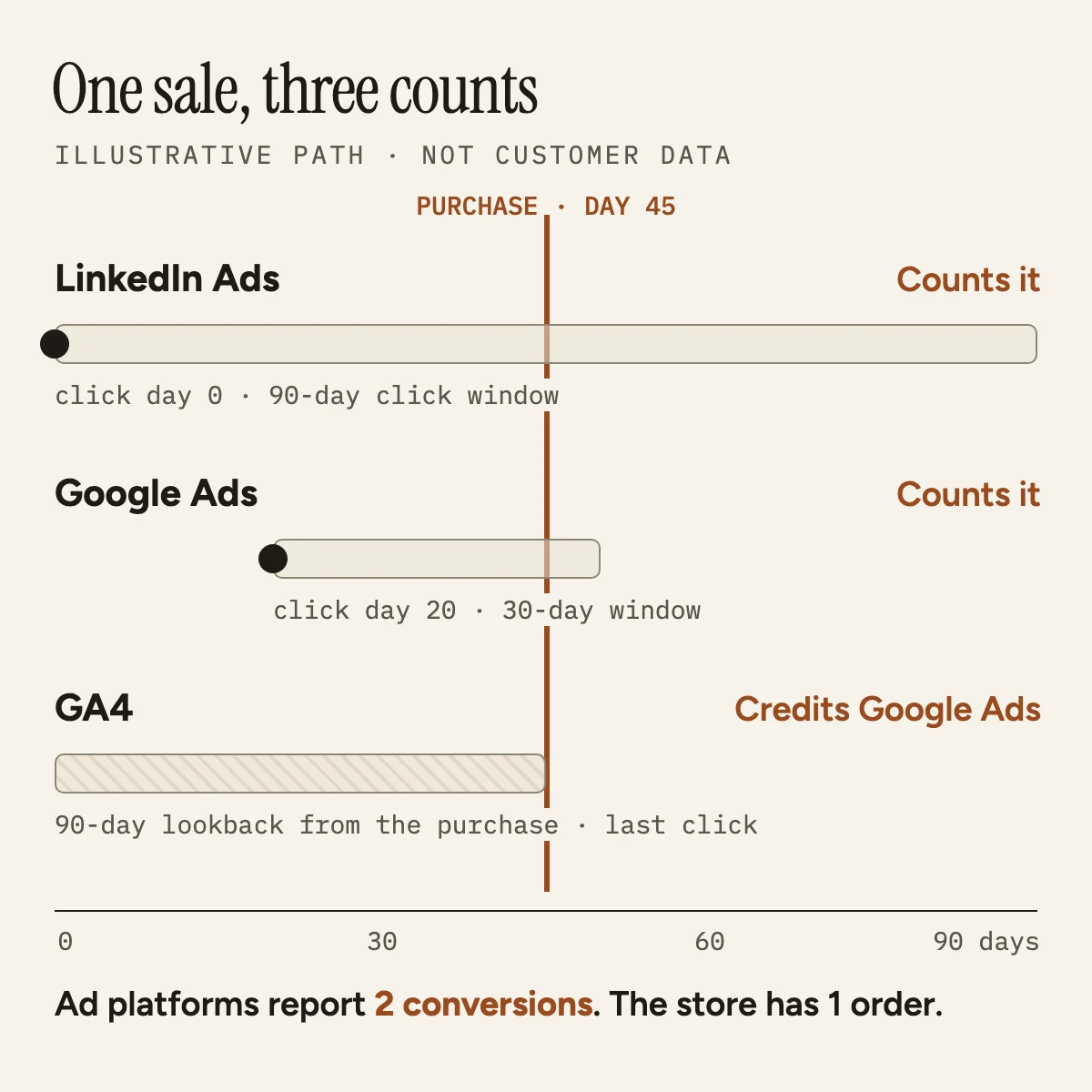
Fig. 1 · One illustrative buyer path under default windows, not customer data. Source: Google Ads Help, Google Analytics Help and LinkedIn Help, read 16 November 2026.
Move the purchase to day 55 and the result changes. The Google Ads click is now 35 days old, outside the default window, so Google Ads no longer counts the sale. LinkedIn still does.
Views Count on Some Platforms and Not Others
A platform with a view-through window can count a sale from someone who never clicked. GA4's paid and organic last click model gives 100% of the credit to "the last channel that the customer clicked through (or engaged view through for YouTube)." A LinkedIn ad that someone only saw earns LinkedIn nothing in that GA4 report, while LinkedIn's own 90-day view default counts it.
Every Platform Claims the Sale
Each platform reports the conversions it can attribute to its own ads. None of the vendor pages above describes removing a conversion that another platform has already counted. Add two platforms' totals and one order can appear twice, as it does in Fig. 1.
The count you can defend is the one in your own system: orders, sign-ups or CRM records. Our guide to data reconciliation shows how to compare a platform total with that count, and which gaps to accept.
The Same Conversion Can Land on Different Days
Windows also interact with reporting dates. Meta's developer docs say its Insights API reports on-Meta actions, such as link clicks, on the impression date, and off-Meta actions, such as web purchases, on the conversion date. A week of conversions in one tool can include sales that another tool puts in the following week. Clicks and sessions disagree for other reasons, covered in our post on link clicks, landing page views and GA4 sessions.
What Happens When You Change an Attribution Window?
The past stays as it was. In Google Ads, GA4, LinkedIn and Microsoft Advertising, a new window applies from the day you change it, so any report that spans the change mixes two rules.
Setting | What a change affects | The vendor's words |
|---|---|---|
Google Ads conversion window | Conversions from the day of the change onward | "any changes apply to all conversions going forward" |
GA4 key event lookback window | Data from the day of the change onward | "Changes to the lookback window apply going forward" |
GA4 reporting attribution model | Past and future data | "applies to historical and future data" |
LinkedIn conversion window | Conversions counted after the change | "won't affect the number of historic conversions" |
Microsoft Advertising conversion window | New conversions only | "Past conversions aren't affected" |
TikTok ad group attribution settings | Nothing. The setting is fixed once the ad group is published | TikTok's help page says to create a new ad group to use different windows |
GA4 is where this catches people out. Change the reporting attribution model and last month's reports change too. Change the lookback window and they don't.
Google's own Google Ads example shows the other edge. An ad is clicked on March 1 under a 30-day window. On March 7 the window drops to 10 days, and on March 16 it rises to 20. A March 13 conversion from that click "won't be retroactively counted," even though the final window covers it. Write down the date of every window change next to the reports it touches.
Which Attribution Window Should You Use?
Use a window that covers how long your customers take to buy, and set it the same way on every platform you plan to compare. Neither a short nor a long window is more correct. Each one answers a different question.
Google points to the time lag report in Google Ads attribution reports, which shows how long people take between an ad interaction and a conversion. Its rule of thumb: "If 75% of conversions happen between the 25th and 30th day after an ad interaction, you'll want to make sure you set a window for at least this long." For Search and Display, Google recommends windows of at least 7 days, "because they provide a richer set of conversion data." LinkedIn leans the same way: "You typically will want to use a longer conversion window to increase your chances of attributing a tracked conversion."
The window also changes what bidding learns from. Google says Smart Bidding strategies such as Target CPA and Target ROAS "will count and optimize conversions for any window you choose." Shorten the window, and the conversions that fall outside it drop out of what bidding sees.
What You Give Up
Every choice costs something:
- A longer window credits more conversions and overlaps more with other platforms. Conversions from recent clicks keep arriving until the window closes, so recent totals take longer to settle.
- A shorter window settles faster but drops slow buyers. In Google's example, with a 7-day window, a conversion more than 7 days after the ad interaction "won't appear in your reports."
- A view-through window adds conversions from people who never clicked. Those show exposure to the ad, not a response to it.
- Aligning windows across platforms makes the counts comparable. It doesn't remove double counting, because each platform still credits its own ads.
How to Compare Conversion Counts Across Platforms in 6 Steps
Run these steps before you put two platforms' conversions in the same table or report:
- Record each number's window. In GA4, open Admin, then Events under Data display, then Attribution settings. In Google Ads, open the conversion action's Settings tab. In TikTok Ads Manager, the windows sit in the ad group's Attribution settings under Bidding and Optimization. You should end with one click window and one view window per number.
- Mark which numbers include views. A count with view-through conversions and a count without them measure different things. Label each number "clicks only" or "clicks and views".
- Name the attribution model. GA4 offers data-driven, paid and organic last click, and Google paid channels last click. LinkedIn uses last touch for most conversion types. Microsoft Advertising's API lists DataDriven, LastTouch and LastClick. Each number should carry its model.
- Match the dates. Use the same date range and time zone in every tool, and check whether each one reports a conversion on the ad interaction date or the conversion date. The ranges should match to the day.
- Compare each platform with your own count, not with the others. Put backend orders or CRM records beside each platform total, and keep platform totals in separate columns. Never add them together to get a total.
- Log every window change. Note the date, the old window and the new one, since most platforms apply a change only going forward. Any report that spans a change should carry that note.
Where SignalBraid Stands
SignalBraid is in development, with access by invitation. It is a read-only data hub, built so every number carries its source account, date range, data-through time and definition version. A conversion count is only comparable once you know its window, so record the window next to the number in whatever tool you use today. We explain why its AI connection is read-only in Why SignalBraid's AI Access Is Read-Only, on Purpose.
Status on 16 November 2026, from the registry: Google Ads: Planned. Google Analytics 4: Planned. LinkedIn Ads: Planned. TikTok Ads: Planned. Microsoft Advertising: Planned · beta. Meta Ads: Planned · beta. The full list is on the connectors page.
Vendor pages last verified: 16 November 2026
Sources (read 16 November 2026)
- Google Ads Help, "About conversion windows". https://support.google.com/google-ads/answer/3123169
- Google Analytics Help, "Select attribution settings". https://support.google.com/analytics/answer/10597962
- Google Analytics Help, "Get started with attribution". https://support.google.com/analytics/answer/10596866
- LinkedIn Marketing Solutions Help, "LinkedIn conversion window". https://www.linkedin.com/help/lms/answer/a426359
- TikTok for Business, "Fuel your TikTok campaign measurement with flexible attribution windows" (23 June 2022). https://ads.tiktok.com/business/en/blog/flexible-attribution-windows-campaign-measurement
- TikTok Ads Manager Help, "How to Create Attribution Windows for your Ad Group" (last updated November 2025). https://ads.tiktok.com/help/article/attribution-settings-at-the-ad-group-level
- Microsoft Learn, "ConversionGoal Data Object", Microsoft Advertising API (updated 27 February 2026). https://learn.microsoft.com/en-us/advertising/campaign-management-service/conversiongoal
- Meta for Developers, Insights API best practices ("Discrepancy with Ads Manager"). https://developers.facebook.com/documentation/ads-commerce/marketing-api/insights/best-practices
- Meta for Developers, "Insights API Breakdowns". https://developers.facebook.com/documentation/ads-commerce/marketing-api/insights/breakdowns
- SignalBraid connector registry, as rendered on signalbraid.com/connectors/ on 16 November 2026.