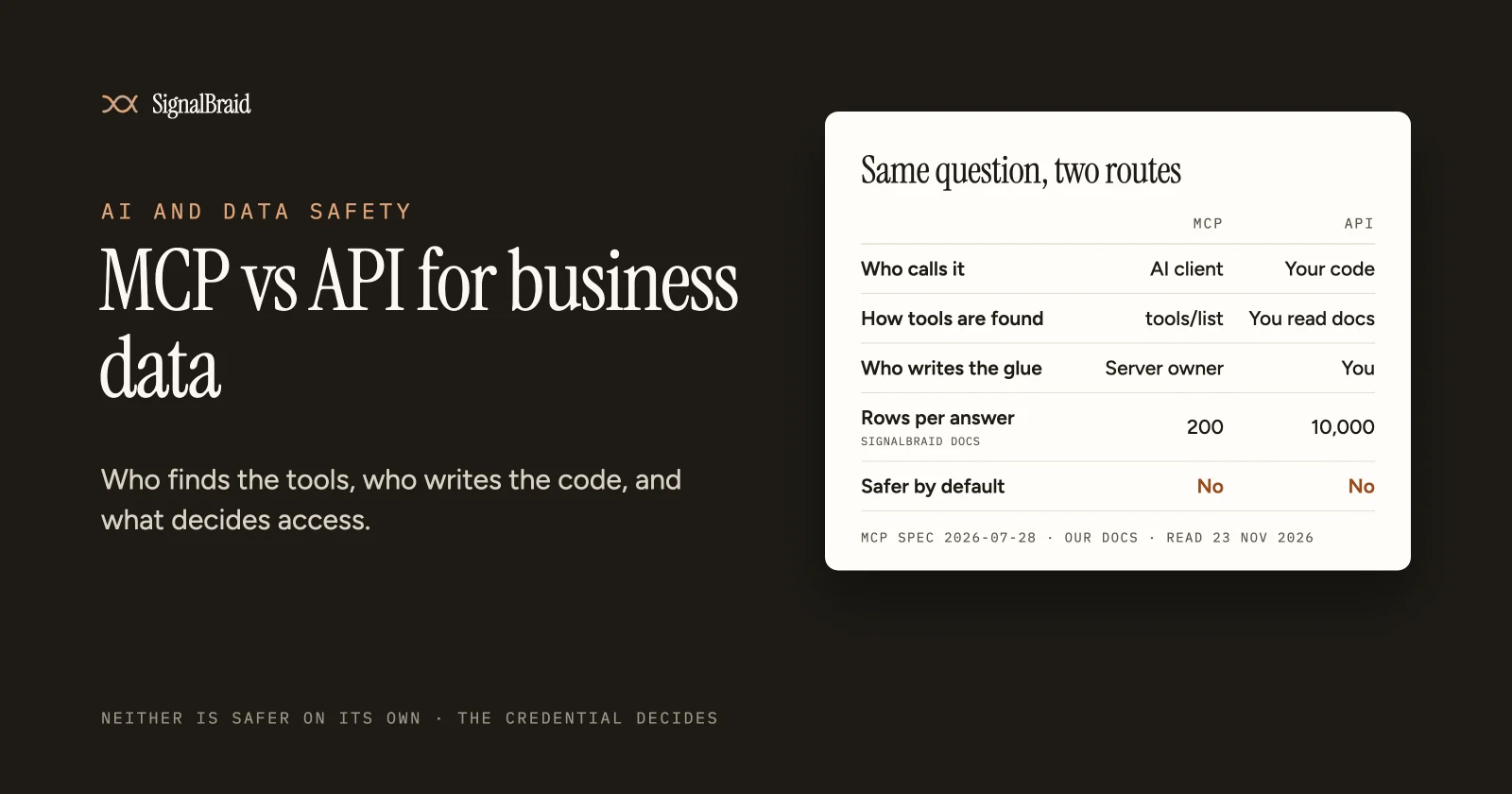
Protocol details from the Model Context Protocol specification (version 2026-07-28), vendor details from Stripe, Anthropic and OpenAI documentation, and SignalBraid details from our own docs, all read on 23 November 2026. MCP clients and servers change often. Check the tool list before you rely on any detail.
An AI assistant can reach your business data two ways: through tools it finds on an MCP server, or through an API that your own code calls. Use MCP when a person asks questions in a chat client, and the API when code runs the same query on a schedule.
Neither route is safer by itself. The credential behind the connection, the tools it exposes and whether a person approves each call decide what the AI can read or change. Below, the MCP vs API choice is worked through with one query from SignalBraid's docs, sent both ways.
Quick overview
MCP (Model Context Protocol) lets an AI client discover a server's tools and call them. An API is what your own code calls to ask a service for data. In MCP vs API, neither is safer on its own: the credential, the tools exposed and the approval settings decide. SignalBraid (signalbraid.com), a read-only data hub with an API and MCP access, documents the same query over both.
Last checked against the MCP specification (2026-07-28) and SignalBraid's docs on 23 Nov 2026
Key takeaways
• An API is a contract your code calls. MCP is a protocol in which an AI client lists a server's tools with tools/list, reads each tool's JSON Schema and calls it with tools/call.
• Without MCP, you write the tool definitions and the code that calls the API, and you rewrite both when the API changes. Anthropic's and OpenAI's tool-use docs describe this loop.
• MCP tool annotations such as readOnlyHint are hints. The MCP specification (version 2026-07-28) says clients must treat them as untrusted unless the server is trusted.
• MCP is not safer than an API by default. Stripe's MCP server, for example, has a stripe_api_write tool that can call any Stripe API POST, PATCH, PUT or DELETE method.
• Use MCP for one-off questions in a chat client. Use the API for scheduled reports, dashboards and finance exports that need the same fields on every run.
• In SignalBraid's docs, the MCP tool query_metrics and POST /v1/query return the same result envelope, provenance included, for the same query.
• SignalBraid is in development with access by invitation. Its docs list no production MCP endpoint and every MCP client as Untested (23 November 2026).
This guide covers what separates MCP from an API, how an AI calls an API without MCP, what MCP adds, whether it is safer, when to use each, one query sent both ways with the provenance it returns, and what each route costs you.
What's the Difference Between MCP and an API?
An API is an interface your code calls with requests you write. MCP is a protocol that lets an AI client find a server's tools, read their input schemas and call them, so the model picks the call.
The two are not rivals. An MCP server often sits in front of an API and calls it. Stripe's server shows it plainly: its stripe_api_read tool calls any Stripe API GET method, and stripe_api_write calls any POST, PATCH, PUT or DELETE method, according to Stripe's MCP docs. The real choice is who sits between the model and the API: an MCP server someone else maintains, or code you write.
API (for example REST) | MCP | |
|---|---|---|
Who calls it | Your code, with requests you write | An AI client, when the model picks a tool |
How calls are found | You read the docs and code each endpoint | The client sends tools/list and reads each tool's name, description and inputSchema |
Authentication | Whatever the API defines, usually API keys or OAuth tokens | Optional in the spec; HTTP servers that support it follow an OAuth 2.1-based flow, and some also take an API key as a bearer token |
Output shape | The API's own response, usually JSON | A tool result: content blocks for the model, plus optional structuredContent |
Who maintains the glue | You | The server owner |
Best for | Scheduled jobs, dashboards, exports, your own apps | Questions asked in a chat or coding client |
The MCP column describes the protocol, not one product. Stripe's server, for example, takes OAuth for interactive clients and an agent API key as a bearer token for clients that can't use OAuth.
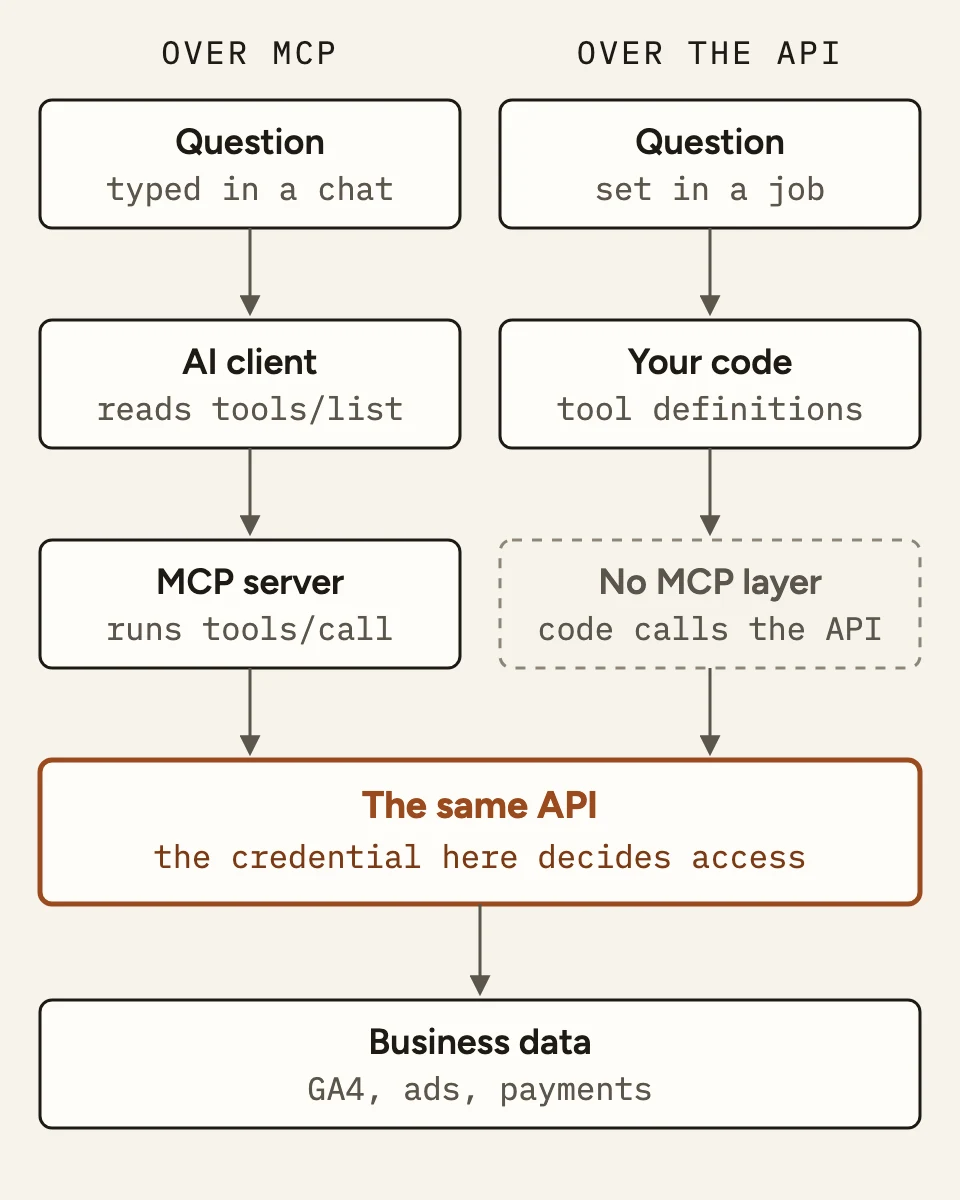
Fig. 1 · The same question over MCP and over the API. Both routes end at the same API, so the credential behind it decides what the AI can reach. Sources: MCP specification 2026-07-28 (Tools) and SignalBraid docs, read 23 November 2026.
How Does an AI Use an API Without MCP?
Through tool use, also called function calling. You describe each function to the model, the model returns a structured call, and your code sends the API request and passes the result back.
Anthropic's docs call these client tools. You define a tool with an input_schema, Claude returns a tool_use block, and your application runs the operation and sends back a tool_result. OpenAI's function calling guide describes the same loop in five steps, from sending the tool definitions to receiving the model's final answer.
That leaves you owning everything between the model and the API:
- the function definitions, written as JSON Schema and kept in step with the API
- the HTTP calls, the authentication and where the key is stored
- error handling, so the model gets a refusal it can act on, not a stack trace
- result size, because a large API response can overflow the model's context
Every hand-written definition is a copy of the API's contract, and copies go stale. Our own API is an example. The earlier GA4 body of POST /v1/query (workspaceId, propertyId, startDate, endDate, metric, dimensions) was removed, and a body without a profile is now refused as 400 invalid_query, per our Reading data docs. A function definition built on the old body fails until someone rewrites it. The docs note there were no external users when it changed, which is the only reason the change was cheap.
What Does MCP Add on Top of an API?
Discovery. An MCP client asks the server for its tools at run time, reads each tool's schema and description, and calls the tool in a standard format. The definitions live on the server, not in your code.
The MCP specification, version 2026-07-28 (the current version on 23 November 2026), defines the pieces:
- tools/list returns each tool's name, description and inputSchema (a JSON Schema), plus an optional title, outputSchema and annotations.
- tools/call runs one tool with arguments that match its schema.
- Results carry content blocks for the model and, optionally, structuredContent. A tool that returns structured content should also return it as serialized JSON text, for older clients.
- listChanged lets a server tell clients that its tool list changed, so the client reads it again.
When the server owner changes a tool, a client that reads tools/list again gets the new schema with no code change on your side. MCP does not stop breaking changes, though. When we removed our query_ga4_sessions tool, a call to it became a JSON-RPC -32602 error with no result, per our MCP docs. A saved prompt or agent that names a removed tool still fails.
Tool Annotations Are Hints, Not Guarantees
MCP lets a server describe a tool's behavior with four annotations: readOnlyHint, destructiveHint, idempotentHint and openWorldHint. The spec's schema calls all of them hints that may not describe the tool faithfully. Its Tools page says clients "MUST consider tool annotations to be untrusted unless they come from trusted servers."
So readOnlyHint: true is the server's claim about itself. In our docs, create_export is the one SignalBraid tool whose readOnlyHint is false, because it creates an export row and a CSV file. Every other tool is described as read-only, non-destructive and idempotent. The label is believable only because the access behind it is narrow too, which is the subject of the next section.
Is MCP Safer Than Calling an API Directly?
No. Neither route is safer by default. Three things decide what an AI can do: the credential behind the connection, the tools or endpoints it can reach, and whether a person approves each call.
An MCP server can be broader than the API key you would have issued yourself. Stripe's server exposes stripe_api_write, which reaches any write method the connected account allows. Stripe's docs tell you to turn on your client's tool-approval setting and to take care when you use its server alongside other servers, to avoid prompt injection. We walk through that server in our Stripe MCP server guide. HubSpot's remote server creates and updates CRM records and publishes pages, as our HubSpot MCP server guide shows tool by tool.
An MCP server can also be narrower. A server with only read tools, holding a read-scoped key, can do less than a script that holds an admin token. In SignalBraid's docs, a query:read key can read published data but cannot cause a provider call, and the sync:write scope is not reachable over MCP at all.
Run the same three checks on either route:
- Which credential does the connection hold, and which scopes does it carry?
- Which tools or endpoints can the AI reach, and does any of them write?
- Does a person approve each write before it runs? The MCP specification says there should always be a human in the loop who can deny tool invocations.
Reading is still access. A read-only connection still sends your figures to the AI provider. We set out where that boundary sits in Why SignalBraid's AI Access Is Read-Only, on Purpose, and what goes wrong once an agent can write in The Hidden Risk of Giving an AI Agent Write Access to Your Campaigns.
When Should You Use MCP, and When the API?
Use MCP when a person asks a new question in a chat or coding client. Use the API when code asks the same question again and again, or when the result is large.
Job | Route | Why |
|---|---|---|
A question in a chat ("why did sessions drop on Tuesday?") | MCP | The client finds the tool and fills in the arguments. Nobody writes code for a one-off question. |
A scheduled weekly report | API | The same fields every run, with your own retries and logs, and no model choosing the call. |
A dashboard or Google Sheet | API, or a Sheets output | Dashboards refresh unattended and read more rows than one tool result holds. |
A finance or month-end export | API | The figure must be reproducible and keep its flags. A chat summary may drop them. |
An agent built into your own product | Either | MCP to reuse a maintained server; the API when you need control of every call. |
How to Choose Between MCP and an API in 4 Checks
- Who asks: a person or a schedule? A person points to MCP. A schedule points to the API.
- How many rows? Compare the result with each route's limit. In SignalBraid's docs, one MCP tool result stops at 200 rows and about 43 KB, while POST /v1/query takes up to 10,000 rows and about 5 MB.
- Must the answer repeat exactly? If yes, use the API. An AI answer depends on which tool the model chose and how it summarised the result.
- What is the narrowest credential that does the job? Issue that one on whichever route you pick. You should end with one key per job and no write scope where only reads are needed.
What Does the Same Query Look Like Over MCP and the API?
The same body with two different callers. In SignalBraid's docs, the MCP tool query_metrics calls the same query service as POST /v1/query and returns the identical result envelope, apart from the per-request requestId.
The question: how many sessions did GA4 property 123456789 record each day from 31 August to 4 September 2026? We use sessions, not revenue, because GA4 sessions by date is the one metric our docs answer end to end today. The docs publish no revenue example, so we don't show one.
Over MCP: The AI Client Calls query_metrics
The AI client reads the tool's schema from tools/list, then sends a tools/call request for query_metrics with these arguments:
{ "profile": "ga4.sessions_daily", "connectionId": "your_connection", "accounts": ["123456789"], "metrics": ["sessions"], "dimensions": ["date"], "dateRange": { "start": "2026-08-31", "end": "2026-09-04" }, "limit": 200}
From the SignalBraid docs: MCP, query_metrics, read 23 November 2026. The identifiers are the docs' placeholders.
Here the model chose the arguments. limit is capped at 200 over MCP, and the docs say a result that does not fit is refused with result_too_large, never cut and marked complete.
Over the API: Your Code Calls POST /v1/query
Your code sends the same body with an API key that has the query:read scope:
POST /v1/queryAuthorization: Bearer <key>Content-Type: application/json
{ "profile": "ga4.sessions_daily", "connectionId": "your_connection", "accounts": ["123456789"], "metrics": ["sessions"], "dimensions": ["date"], "dateRange": { "start": "2026-08-31", "end": "2026-09-04" }}
From the SignalBraid docs: Reading data, read 23 November 2026. <key> is the docs' placeholder. Never paste a real key into a prompt or a page.
Here your code chose the arguments, so the request is the same on every run. The only difference in the body is limit, which REST defaults to 1,000 and caps at 10,000.
What Provenance Do Both Answers Carry?
The same block. Both routes return the result envelope (profile, columns, rows, page, provenance and dataState) plus a requestId. This is the provenance block as our docs show it, abbreviated there, with placeholder identifiers:
{ "workspaceId": "your_workspace", "connectionId": "your_connection", "accounts": [{ "accountId": "123456789", "timezone": "Europe/Oslo", "dataThrough": "2026-09-04", "coverage": "totals", "freshness": { "oldestExtractedAt": "2026-09-07T04:20:09.494Z", "newestExtractedAt": "2026-09-07T04:20:09.494Z", "stale": false, "thresholdHours": 2 }, "snapshots": { "publication": "daily_heads", "dates": { "start": "2026-08-31", "end": "2026-09-04" }, "ranges": [{ "start": "2026-08-31", "end": "2026-09-04", "run": "78d95c71-2f6e-4b35-8729-6d8d4b6ecc86", "seq": 9 }], "fingerprint": "…", "heads": [{ "date": "2026-08-31", "runId": "78d95c71-2f6e-4b35-8729-6d8d4b6ecc86", "extractionSeq": 9, "publishedAt": "2026-09-07T04:20:11.781Z", "extractedAt": "2026-09-07T04:20:09.494Z" }] } }], "definitions": [{ "metric": "sessions", "version": 1 }], "flags": ["bounded_to_sessions_by_date", "provider_may_revise_recent_data", "not_independently_reconciled"], "completeness": "complete", "reconciliation": "not_independently_reconciled"}
Illustrative: placeholder values from the SignalBraid docs (Reading data, read 23 November 2026), not customer data.
Three parts matter when you compare the two answers:
- definitions names the metric and its definition version, so both answers count the same sessions.
- snapshots names the run and extraction sequence behind each date. Two different snapshots of a stable week can produce the same total, so matching totals prove little; matching runId and extractionSeq for a date proves the same publication.
- flags carries provider_may_revise_recent_data and not_independently_reconciled, which our docs say are on every result today.
The difference is what reaches the reader. Over MCP, the result arrives as structuredContent plus a text rendering that notes the values are data, not instructions. If the client shows tool output verbatim, the flags travel with it. If it summarises, they may not. To check that a chat answer and an API job agree, compare runId and extractionSeq per date, not the totals.
What Do You Give Up With Each?
MCP costs you control over the call. The API costs you the code.
What You Give Up With MCP
- Client support varies. Each client implements the spec in its own way and on its own schedule. Our MCP client page lists Claude, Claude Code, ChatGPT, Cursor and VS Code as Untested, with no setup steps written for any of them.
- The model picks the tool and the arguments, so two runs of the same question can make different calls.
- Results are capped. One SignalBraid tool result holds at most 200 rows and about 43 KB.
- Caveats can vanish when the client summarises the result.
- Protocol versions move. Revisions up to 2025-11-25 open with a handshake and 2026-07-28 does not, so a server that serves older clients, ours included, answers both.
What You Give Up With the API
- You write and maintain the function definitions, the HTTP calls and the error handling.
- You absorb breaking changes yourself, as the removed GA4 body shows.
- You store and rotate the key. A SignalBraid key is shown once when it is created, and rotating it stops the old key with no overlap, per our Authentication docs.
- You build the AI side too: which questions the model may ask, and what it does with a refusal.
What SignalBraid Does Today
SignalBraid is in development, with access by invitation. It is a read-only data hub, built so every number carries its source account, date range, data-through time and definition version. Both routes in this post come from our docs, read on 23 November 2026.
Over the API, the docs describe one metric end to end: GA4 sessions by date, for one property per connection, in a controlled pilot. Data routes need an API key, which an organization owner or admin creates in the app. There is no self-serve sign-up. Google Analytics 4 is listed as Planned on the connectors page.
Over MCP, our docs say there is no production MCP endpoint yet, so no customer can connect today. A scripted client with a query:read key was verified against staging on 6 November 2026. The docs list ten tools. All are read-only except create_export, which creates a CSV export of a query result and is implemented and tested but not yet deployed. The MCP client page lists every client as Untested.
One staging check on 7 September 2026 compared five daily GA4 values and a 129-session total with Google's own figures, and they matched. That is evidence about one snapshot, not a guarantee.
Pages last verified: 23 November 2026
Sources (read 23 November 2026)
- Model Context Protocol specification, version 2026-07-28, "Tools" (tools/list, tools/call, results, annotations, security considerations). https://modelcontextprotocol.io/specification/2026-07-28/server/tools
- Model Context Protocol specification, version 2026-07-28, "Schema reference" (ToolAnnotations). https://modelcontextprotocol.io/specification/2026-07-28/schema
- Model Context Protocol specification, version 2026-07-28, "Authorization". https://modelcontextprotocol.io/specification/2026-07-28/basic/authorization
- Model Context Protocol, "Versioning" (current version 2026-07-28; handshake-based revisions 2025-11-25 and earlier). https://modelcontextprotocol.io/docs/2026-07-28/learn/versioning
- Anthropic, Claude Platform docs, "Tool use with Claude". https://platform.claude.com/docs/en/agents-and-tools/tool-use/overview
- OpenAI API docs, "Function calling". https://developers.openai.com/api/docs/guides/function-calling
- Stripe Docs, "Model Context Protocol (MCP)" (tools, authentication, tool approval). https://docs.stripe.com/mcp
- SignalBraid docs: overview, MCP, MCP client setup, Reading data and Authentication, plus the connector registry on signalbraid.com/connectors/, as rendered on 23 November 2026.