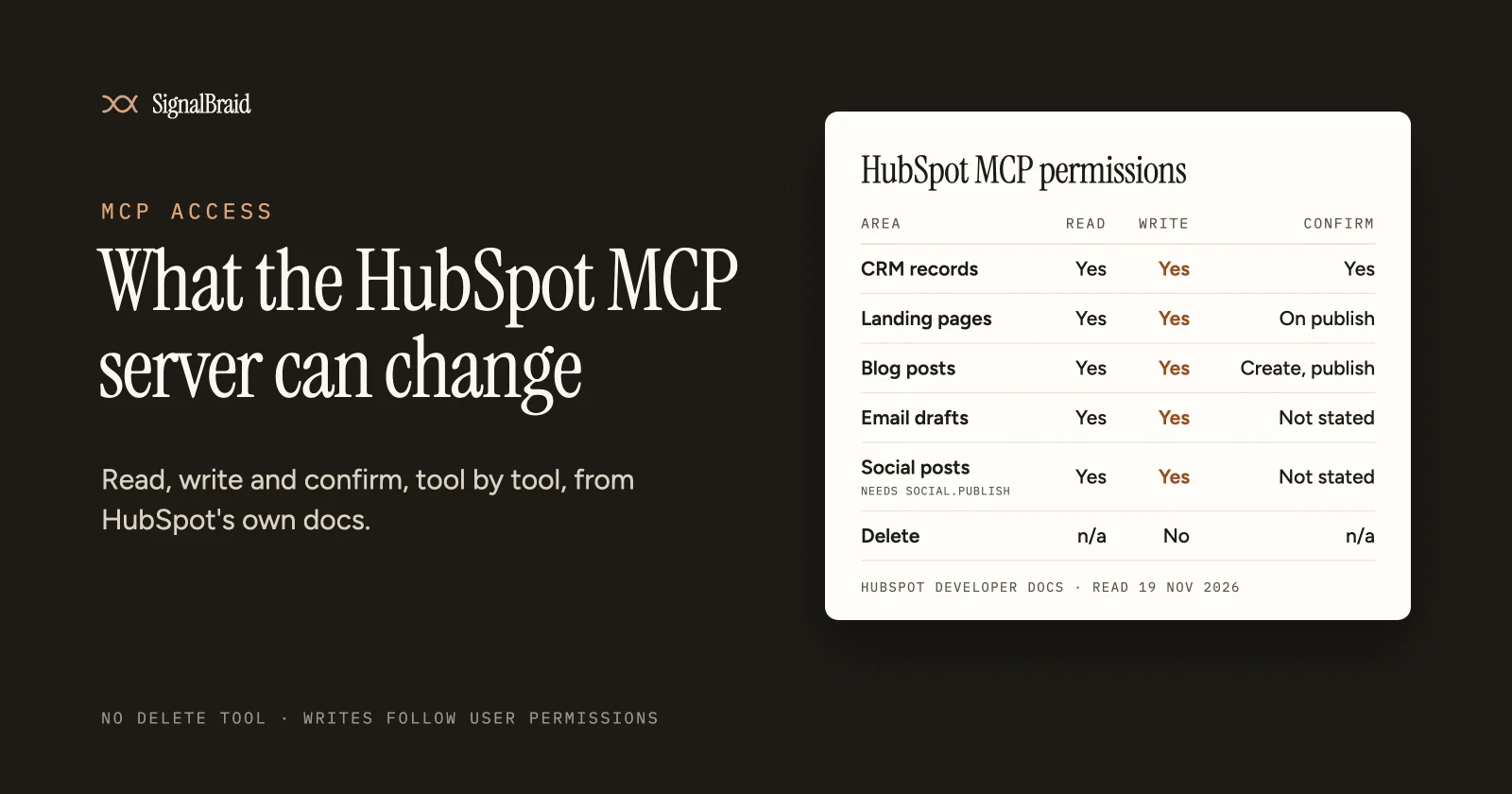
Product details from HubSpot's developer documentation, Knowledge Base and developer changelog, read on 19 November 2026. HubSpot changes its MCP tools often. Check the tool list before you rely on any detail.
Connecting HubSpot to Claude takes a few minutes. Finding out whether that connection can edit a deal or publish a blog post takes reading the tool list, and the answer is yes: the official HubSpot MCP server reads and writes.
It can create and update CRM records, edit and publish landing pages, website pages and blog posts, change campaigns and draft marketing emails. HubSpot's docs describe no read-only mode. How much the AI can change depends on three things you control: the permissions of the HubSpot user who connects, the permissions granted when the connector is approved, and whether write tools wait for a person to confirm.
Quick overview
The HubSpot MCP server is HubSpot's hosted endpoint (mcp.hubspot.com) that lets AI tools such as Claude and ChatGPT read and change CRM data over OAuth. It became generally available on 13 April 2026. It creates and updates records, publishes pages and blog posts, and changes campaigns, but HubSpot lists no delete action. SignalBraid (signalbraid.com), a read-only data hub with an API and MCP access, lists HubSpot as Planned.
Last checked against HubSpot's developer docs and Knowledge Base on 19 Nov 2026
Key takeaways
• HubSpot runs two MCP servers: the remote HubSpot MCP server at mcp.hubspot.com, for AI tools that work inside your account, and the Developer MCP server, which runs locally through the HubSpot CLI to build apps and CMS content.
• The remote server reads CRM records, activities, inbox conversations, campaigns, landing pages, website pages, blog posts, marketing email analytics and social posts.
• It writes CRM records and activities; creates, edits and publishes landing pages, website pages and blog posts; creates and updates campaigns and marketing email drafts; and creates or schedules social posts once the social.publish scope is granted.
• HubSpot's tool docs require explicit confirmation before CRM creates and updates, segment writes, campaign changes, and creating or publishing pages and blog posts. Marketing email drafts, social posts and custom properties carry no confirmation note.
• HubSpot says "All actions respect your existing HubSpot user permissions," so the server cannot do more than the person who connected it.
• Read-only comes from the connecting user's role, the optional permissions a Super Admin leaves off, and write tools blocked in the AI client. It is not a single switch.
• A read-only connection still sends contact details, conversations and deal values to the AI tool you connect.
This guide covers the two HubSpot MCP servers, what the remote server reads, a tool-by-tool table of what it can change, how permissions narrow it, six steps to connect it to Claude read-only, what read-only costs you, and when the HubSpot API is the better choice.
What Is the HubSpot MCP Server?
The HubSpot MCP server is a HubSpot-hosted Model Context Protocol endpoint that lets an AI tool work with the CRM data in your account. HubSpot's docs say it "enables an agent to read, write, and update HubSpot records (contacts, companies, deals, tickets, and more) as a user would."
HubSpot's own connectors for Claude, ChatGPT, Microsoft Copilot and Gemini run on this server. The server left beta and became generally available to all HubSpot accounts on 13 April 2026, according to HubSpot's developer changelog. That release added write access. HubSpot corrected the changelog's read and write lists two days later, so read the current docs rather than the announcement.
There are two ways in. Most teams use HubSpot's ready-made connector inside Claude or ChatGPT. Builders create their own MCP connector in HubSpot (Development, then MCP Connectors) and point any MCP client that supports OAuth with PKCE at https://mcp.hubspot.com.
One conflict to know about: HubSpot's MCP landing page at developers.hubspot.com/mcp still lists campaigns, landing pages, website pages and blog posts as read-only. The developer docs and both connector pages in the Knowledge Base, updated 19 November 2026, list write tools for all four. This guide follows the docs.
Remote MCP Server vs Developer MCP Server
HubSpot runs a second, separate server for developers. It does a different job:
Remote HubSpot MCP server | Developer MCP server | |
|---|---|---|
Job | Reads and changes CRM data and content in a HubSpot account | Builds HubSpot apps and CMS content in your code editor |
Runs | Hosted by HubSpot at https://mcp.hubspot.com | Locally, installed with HubSpot CLI 8.2.0 or later (hs mcp setup) |
Sign-in | OAuth with PKCE, through HubSpot's connector or your own MCP connector | Your HubSpot CLI authentication |
Clients HubSpot names | Claude, ChatGPT, Microsoft Copilot and Gemini connectors; any MCP client with OAuth and PKCE | Claude Code, Codex CLI, Cursor, Gemini CLI, VS Code, Windsurf |
Can it change things? | Yes. Records, pages, blog posts, campaigns, email drafts, social posts | Yes. It creates, uploads and deploys projects and can create test accounts |
The rest of this guide is about the remote server, because that is the one a marketing or sales team connects to Claude or ChatGPT.
What Can the HubSpot MCP Server Read?
Almost everything a HubSpot user sees day to day, limited to what the connecting user can access. HubSpot's integration docs list these read areas:
- CRM records: contacts, companies, deals, tickets, leads, users, appointments, custom objects and segments. Revenue objects (carts, invoices, orders, line items, products, quotes and subscriptions) are readable in beta.
- Activities: calls, emails, meetings, notes and tasks.
- Content and campaigns: blog posts, landing pages, site pages, campaigns and marketing events, plus views, submissions and conversion rates for each page and post.
- Conversations: messages and threads from live chat, team email, WhatsApp, SMS, Facebook Messenger and custom channels.
- Marketing email and social: email drafts, send statistics, per-contact delivery and engagement, connected social accounts, scheduled and published posts and their performance.
- Account context: the user's own permissions, teams, job titles, seat counts and brands. AEO metrics need Marketing Hub Professional or Enterprise.
Three limits matter for reporting. If Sensitive Data is turned on in your account, conversation data is blocked through the MCP server, though not through the standard CRM APIs. For pages and blog posts, the connectors only see data from published items; drafts show metadata only. And the SQL tool, query_crm_data, does not support joins, subqueries, association traversal or currency conversion, so a multi-currency revenue question needs a second step.
What Can the HubSpot MCP Server Change?
CRM records, activities, pages, blog posts, campaigns, email drafts, pipelines, properties, segments and social posts. HubSpot's connector pages for Claude and ChatGPT list no delete action for any object, and the Claude page says the connector "does not support delete operations."
The table lists each write tool from HubSpot's integration docs, what it changes, whether HubSpot's tool description asks for confirmation, and the condition attached. Read tools such as search_crm_objects, query_crm_data and get_content_analytics_report change nothing and are left out.
Tool | What it can change | Confirmation in HubSpot's docs | Condition or scope |
|---|---|---|---|
manage_crm_objects | Creates and updates contacts, companies, deals, tickets, leads, custom objects and activities | Yes, before any create or update, after a proposed-changes summary | The user's edit rights on that object |
manage_segment | Creates segments; adds and removes records from static segments | Yes, before each write | None stated |
manage_campaign_objects | Creates and updates campaigns and their asset associations | Yes, before creating or modifying | None stated |
manage_landing_page | Creates, edits, styles, publishes and clones landing pages | Yes, before creating from a template, publishing or restoring a revision. Not stated for edits | None stated |
manage_website_page | Creates, edits, publishes and clones website pages; edits navigation menus | Yes, before creating, publishing, restoring or changing navigation. Not stated for edits | Claude, ChatGPT and Gemini only |
manage_blog_post | Creates (as drafts), updates and publishes blog posts | Yes, before creating and before publishing. Not stated for updates | Claude, ChatGPT and Gemini only; publishing needs a description and author |
manage_marketing_email | Creates, updates and clones email drafts; manages A/B variants | Not stated | "Create and edit marketing email content" permission |
manage_social_posts | Creates, schedules, updates and cancels social posts | Not stated | social.publish scope |
manage_custom_properties, manage_custom_pipelines | Creates custom properties; creates and manages pipelines | Not stated | Free tools can edit only the default pipeline |
manage_aeo_prompts, manage_aeo_recommendations | Creates tracked prompts; starts content generation for blog and social posts | Yes, for recommendation actions | Marketing Hub Professional or Enterprise |
Quotes are a beta write area: creating and managing quotes needs the optional "manage revenue objects" scope and Revenue Hub Professional or Enterprise. Bulk writes through the Claude and ChatGPT connectors are capped at 10 records at a time. Stripe's server shows the same pattern of broad write tools behind one connection; we walk through it in our Stripe MCP server guide.
Which Actions Ask for Confirmation?
CRM creates and updates, segment writes, campaign changes, and creating or publishing landing pages, website pages and blog posts. HubSpot's tool descriptions say each of these "requires explicit user confirmation" or "requires user confirmation" before it runs.
The gaps are just as specific. Editing the content of an existing page, updating a blog post, drafting marketing emails, managing social posts and creating custom properties carry no confirmation note in the docs we read. A social post scheduled through manage_social_posts can go out without a second prompt, as far as HubSpot's docs say.
The AI client adds its own layer. HubSpot's Claude connector page says Claude "may show you the proposed changes" before writing, and recommends setting the connector's Write tools to Needs Approval. With Always allow, HubSpot warns, "edits may occur without asking for approval." HubSpot's docs don't say whether the server enforces its confirmations or relies on the AI tool to ask, so set approvals in the client as well. We cover approvals and spending limits for agents in The Hidden Risk of Giving an AI Agent Write Access to Your Campaigns.
How Do HubSpot Permissions Limit What an AI Can Do?
Through three layers, and each one can only narrow access. HubSpot's docs state: "All actions respect your existing HubSpot user permissions. Users can only view and modify records they have access to."
The user's role is the strongest control. The connection acts as the person who signed in, so a user who can view deals but not edit them hands over a connection that reads deals and cannot change them. Two read tools make this visible: get_user_details returns the user's per-object read and write access, and discover_hubspot_schema returns read and write status for each object type.
App permissions come next. For the remote server you don't pick scopes by hand. HubSpot sets them from the tools available at install and the permissions the user chooses to grant. When a Super Admin approves HubSpot's connector, they choose who can install it and which optional data permissions it gets. Required permissions can't be turned off.
HubSpot's pages don't list which of the connector's permissions are optional, so check the approval screen in your own account. When HubSpot adds scopes, users must reinstall to grant them.
Social scopes show why names mislead. To create or modify social posts, you must grant social.publish. HubSpot's docs say "The social.read and social.edit scopes only provide read-only access" through the MCP server, despite the word "edit". These social scopes appear on the MCP integration page, not in HubSpot's general scopes reference.
The AI client is the last layer. On Claude Team and Enterprise plans, owners can set each connector's tools to Always allow, Needs approval or Blocked, grouped into read-only tools and write or delete tools, and the setting applies to everyone in the organization. Creates and updates made through the Claude connector are recorded in HubSpot's Audit Log against both the user and the connector.
How to Connect HubSpot to Claude Read-Only in 6 Steps
These steps use HubSpot's connector for Claude. You need a paid Anthropic plan (Pro, Max, Team or Enterprise) and a HubSpot Super Admin for step 2.
- Set up a HubSpot user with view-only access. Give the user permission to view, but not edit, contacts, companies, deals and any other object Claude should read. You should see that this user can open a deal but cannot save a change to it.
- Approve the connector with the fewest permissions. As a Super Admin, go to Settings, Integrations, Connected Apps, Approved apps, then Approve apps. Pick HubSpot's connector for Claude, limit install to the users who need it, and leave optional data permissions off unless a question needs them. You should see the app in the Approved apps table with your chosen install permissions.
- Connect from Claude as the view-only user. In Claude, open Settings, Connectors, Browse, select HubSpot and click Connect. Choose the HubSpot account, review the permissions and click Connect app. You should land back in the Claude chat with HubSpot connected.
- Block or gate the write tools. On Team or Enterprise, an owner sets the connector's write and delete tools to Blocked. On other plans, set Write tools to Needs Approval, as HubSpot recommends. You should see no write tool set to Always allow.
- Ask Claude to run get_user_details. The response lists the user's per-object read and write access. You should see read access on the objects you need and no write access on any of them.
- Try one harmless write. Ask Claude to change a property on a test deal. You should see Claude refuse, the tool blocked or HubSpot reject the change, and the deal's history should show no edit.
What You Give Up With Read-Only Access
Most of the reasons a sales team connects HubSpot to Claude. Read-only has real costs:
- Claude can draft the deal update, the call note or the blog post, but a person has to save it in HubSpot.
- Logging calls, notes and follow-up tasks from the chat stops, and HubSpot lists that among the connector's main uses.
- A separate view-only user is one more account to maintain and review.
- Blocked tools can stop a multi-step request halfway, and approval prompts slow down the ones that run.
Read-only also stops changes, not exposure. Contact details, inbox conversations and deal amounts still reach the AI tool, and HubSpot notes that once data is shared with Claude, Anthropic's terms apply. Reading is still access. We set out where that boundary sits in Why SignalBraid's AI Access Is Read-Only, on Purpose.
HubSpot MCP vs the HubSpot API: Which Should an AI Use?
Use the MCP server for conversational questions a person asks under their own permissions. Use the HubSpot API when the same job runs on a schedule, needs exact numbers or needs scopes you choose yourself. The same choice applies to any business data, and we compare the two routes in MCP vs API.
- Scopes: with your own app on the API, you list required and optional scopes in its configuration, so a reporting job can hold only .read scopes such as crm.objects.deals.read. With the remote MCP server, HubSpot derives the scopes from its tools.
- Queries: the MCP server is built on the CRM search API, and its SQL tool has no joins or currency conversion. The API gives you every endpoint.
- Volume: the connectors create or update 10 records at a time, and connector calls are subject to HubSpot's API usage limits.
- Repeatability: an API job returns the same fields every run. An AI answer depends on which tools the model chose to call.
What SignalBraid Does Today
SignalBraid is in development, with access by invitation. It is a read-only data hub, built so every number carries its source account, date range, data-through time and definition version. HubSpot is listed as Planned on the connectors page (19 November 2026). Our HubSpot connector reference lists read scopes only, such as crm.objects.deals.read and crm.objects.contacts.read, and states "Customer setup unavailable."
Our MCP docs say: "There is no public MCP endpoint." The MCP client page lists Claude and ChatGPT as Untested and says no client has a recorded test yet (both read 19 November 2026). The docs now list ten tools (read 23 November 2026). Nine are read-only. The tenth, create_export, writes one thing: a CSV export of a query result inside SignalBraid, as the export endpoint of our API does. It is implemented and tested but not yet deployed. No tool changes anything in HubSpot, your ad accounts or any other connected source.
HubSpot pages last verified: 19 November 2026
Sources (read 19 November 2026)
- HubSpot Developers, "Integrate AI tools with the HubSpot MCP server" (remote MCP server integration, supported data, permissions and tools). https://developers.hubspot.com/docs/apps/developer-platform/build-apps/integrate-with-the-remote-hubspot-mcp-server
- HubSpot Developers, "Using the HubSpot MCP server". https://developers.hubspot.com/docs/build-with-ai/remote-mcp-server
- HubSpot Developers, "HubSpot MCP Server" landing page (developers.hubspot.com/ai-tools/mcp redirects here). https://developers.hubspot.com/mcp
- HubSpot Developer Changelog, "Remote HubSpot MCP server is now generally available" (announced 13 April 2026, updated 15 April 2026). https://developers.hubspot.com/changelog/remote-hubspot-mcp-server-is-now-generally-available
- HubSpot Developers, "Set up the developer MCP server". https://developers.hubspot.com/docs/developer-tooling/local-development/developer-mcp/setup
- HubSpot Developers, "Developer MCP server tools". https://developers.hubspot.com/docs/developer-tooling/local-development/developer-mcp/tools
- HubSpot Developers, "Scopes". https://developers.hubspot.com/docs/apps/developer-platform/build-apps/authentication/scopes
- HubSpot Knowledge Base, "Set up and use the HubSpot connector for Claude" (updated 19 November 2026). https://knowledge.hubspot.com/integrations/set-up-and-use-the-hubspot-connector-for-claude
- HubSpot Knowledge Base, "Set up and use the HubSpot connector for ChatGPT" (updated 19 November 2026). https://knowledge.hubspot.com/integrations/connect-your-hubspot-account-to-chatgpt
- HubSpot Knowledge Base, "Manage access to apps" (updated 20 October 2026). https://knowledge.hubspot.com/integrations/manage-access-to-apps
- Claude Help Center, "Use connectors to extend Claude's capabilities" (connector tool permissions). https://support.claude.com/en/articles/11176164-use-connectors-to-extend-claude-s-capabilities
- SignalBraid docs, "MCP", "MCP client setup" and the HubSpot connector reference, and the connector registry on signalbraid.com/connectors/, as rendered on 19 November 2026.